
NSOU Assignment Answer Guidelines, Portal Links, and Submission Dates
- NSOU candidates must download and print their assignment submission slip from www.wbnsou.ac.in prior to attempting papers.
- Online MCQ assignments allow 3 hours for 100-mark papers and 2 hours for 50-mark papers with zero negative marking.
- Candidates receive 9 pauses for 100-mark assignment papers and 4 pauses for 50-mark assignment papers on the portal.
- ADPRA Term-End Examination December 2024 Paper II-B project slides must be emailed to nsoujmc@wbnsou.ac.in by 31 October 2026.
In this article
- NSOU assignment: December 2024 term end exam instructions
- NSOU assignment submission slip download: main portal rules
- NSOU assignment answer: adelasqn25.nsou.oepms.in portal
- Netaji Subhas Open University assignment: front page format rules
- NSOU pg assignment: examination form clearance requirements
- NSOU assignment: portal reset procedures for technical errors
- NSOU Assignments official links and PDFs
- What students ask about NSOU Assignments
Netaji Subhas Open University, official acronym NSOU, conducts assignment evaluations for Undergraduate, Post Graduate, and Diploma programmes through online portals and designated study centres. Candidates must download an official assignment submission slip using their enrolment details before attempting online Multiple Choice Question papers or submitting practical project files. Assignment marks carry weightage toward final Term-End Examination results across all academic sessions.
NSOU assignment: December 2024 term end exam instructions
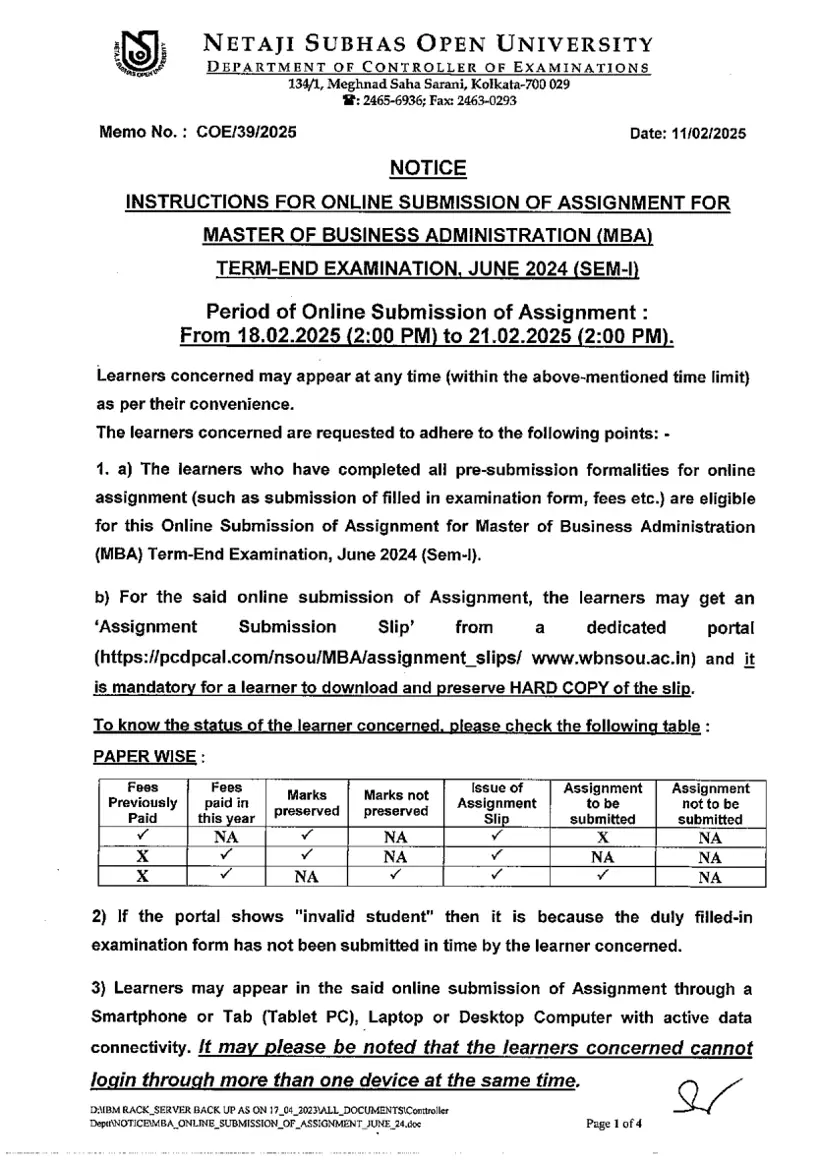
Netaji Subhas Open University issued updated assignment instructions for December 2024 Term-End Examination candidates across diploma and postgraduate courses.
Candidates in the Advance Diploma in Public Relations and Advertising programme must prepare a 10 to 12 slide PowerPoint presentation on public relations relevance and email it to nsoujmc@wbnsou.ac.in by 31 October 2026.
- ADPRA Paper II-B project submissions require candidates to include their Enrolment Number, Roll, and Number in the submission email.
- Candidates must submit only one presentation file to the designated department email address.
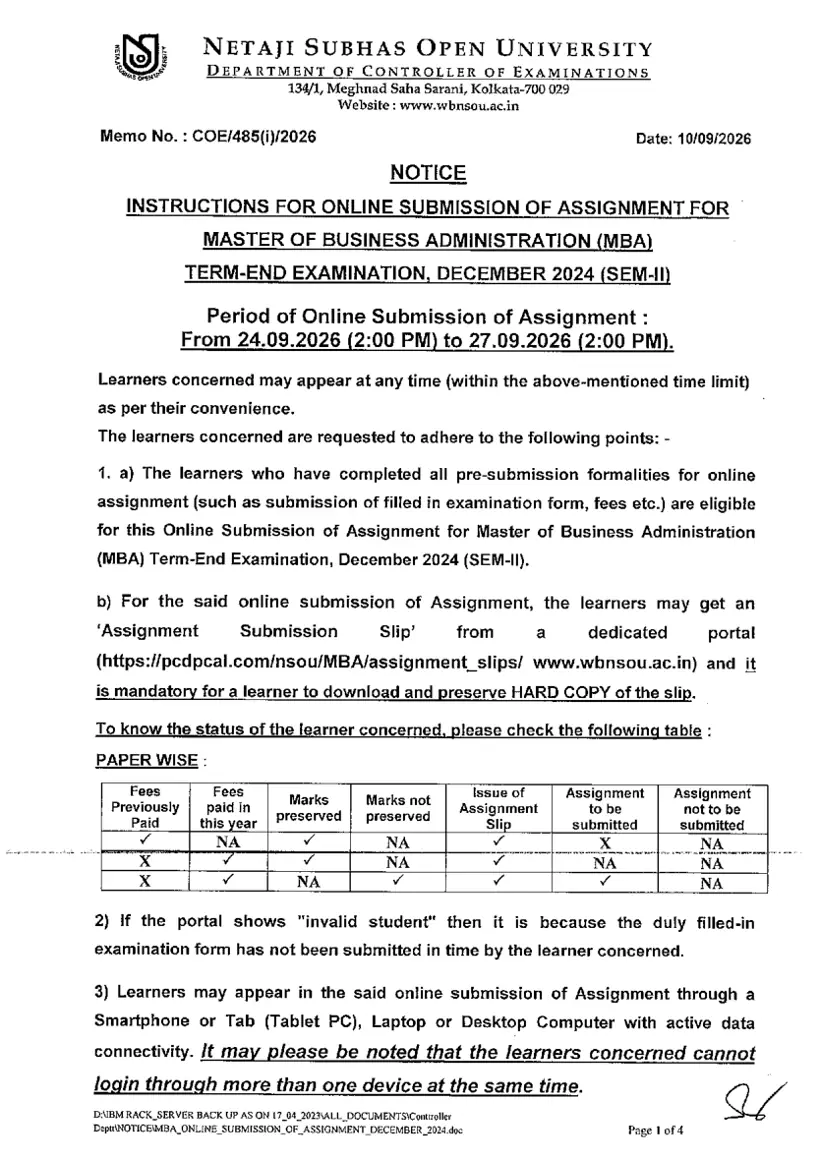
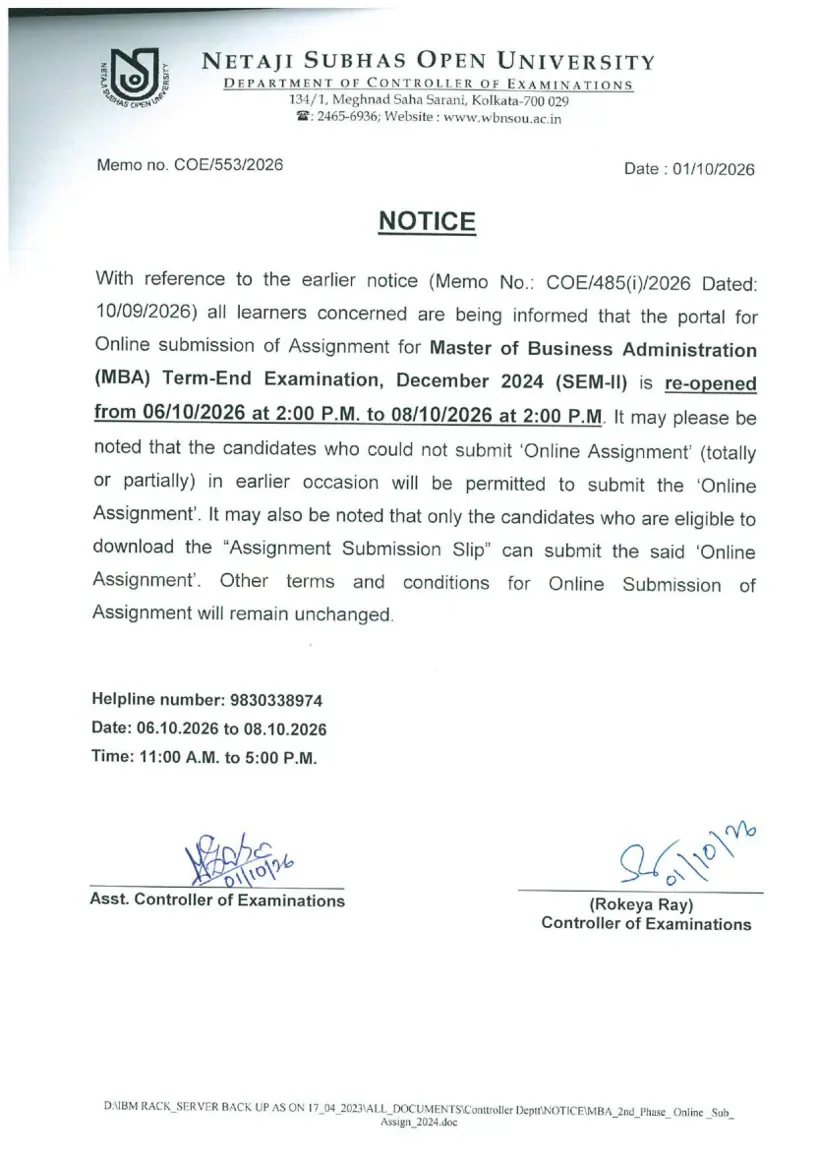
- MBA Term-End Examination December 2024 Semester-II candidates who exhausted attempt pauses were granted a reset portal window until 2:00 p.m. on 07 October 2026.
The essentials
| University Portal | www.wbnsou.ac.in |
|---|---|
| Login Credentials | Enrolment Number and Date of Birth |
| 100-Mark Paper Duration | 3 Hours (20 MCQ Questions, 9 Pauses) |
| 50-Mark Paper Duration | 2 Hours (10 MCQ Questions, 4 Pauses) |
| ADPRA Project Deadline | 31 October 2026 |
| Marks Verification Window | Within 7 Days at Study Centre |
NSOU assignment submission slip download: main portal rules
Candidates eligible for online assignment submission must download an official Assignment Submission Slip from the NSOU assignment main portal before accessing test papers.
The assignment submission slip confirms course paper eligibility based on completed examination form submissions and fee payments.
- Open the university portal NSOU assignments page or designated exam link.
- Enter your Enrolment Number and Date of Birth as printed on your Enrolment Certificate cum Identity Card.
- Enter the One Time Password sent to your Registered Mobile Number or Alternative Mobile Number.
- Click the assignment submission slip link on your candidate dashboard.
- Download and print a hard copy of the Assignment Submission Slip for your records.
NSOU assignment answer: adelasqn25.nsou.oepms.in portal
NSOU online assignments utilize a Multiple Choice Question system hosted on dedicated exam portals such as adelasqn25.nsou.oepms.in.
Candidates log in via smartphone, tablet, laptop, or desktop computer using an active data connection, restricted to one active device at a time.
- Questions appear one at a time on the screen, requiring candidates to submit an answer before loading the next question.
- Submitted answers lock permanently and cannot be edited or reopened.
- Skipping a question without selecting an answer moves to the next question without providing a replacement question.
- There is no negative marking for incorrect or skipped assignment answers.
- Refreshing the browser device during an active pause is strictly prohibited.
- Candidates must download an Acknowledgement Slip after completing each paper as proof of submission.
NSOU Online Assignment Structure and Time Allocation
| Full Marks | Total Questions | Allocated Time | Allowed Pauses |
|---|---|---|---|
| 100 Marks | 20 Questions (1 Mark Each) | 3 Hours | 9 Pauses |
| 50 Marks | 10 Questions (1 Mark Each) | 2 Hours | 4 Pauses |
NSOU: related tasks
Netaji Subhas Open University assignment: front page format rules
For offline assignment evaluations and project submissions, NSOU requires candidates to maintain clean presentation standards and precise candidate details on the front page.
Evaluated offline answer scripts are distributed at local study centres for candidate mark verification.
- Front page details must display candidate Enrolment Number, Roll, Number, Study Centre Code, and Subject Paper Name.
- Marks are deducted for incorrect spelling, untidy work, and illegible handwriting on physical answer scripts.
- Candidates must inspect evaluated answer scripts on the study centre notice board upon distribution.
- Any mark mismatch or evaluation issue must be reported to the study centre Co-ordinator within 7 days for correction.
NSOU pg assignment: examination form clearance requirements
Post Graduate and Advance Diploma candidates must meet specific examination form clearance requirements prior to assignment submission.
Candidates in Post Graduate and BLIS programmes can access assigned subject portals after receiving their Provisional Enrollment Certificate and SLM tokens.
- Advance Diploma candidates in ADEL, ADPR, and ADJMC complete online assignments using 24-hour open windows during specified session dates.
- Candidates attempting 100-mark PG papers on the last submission day must log in at least 3 hours before portal closure.
- Candidates attempting 50-mark papers must log in at least 2 hours before the final portal deadline.
- After completing all online assignment papers, candidates must download evaluated assignment answer scripts on dates notified by NSOU.
NSOU assignment: portal reset procedures for technical errors
Candidates encountering technical errors or exhausted attempt limits on the assignment portal can utilize official university reset procedures.
An ‘invalid student’ error message indicates that the candidate’s examination form or required fees were not processed in time.
- Log in to the designated university assignment submission portal.
- Locate and select the Reset option displayed next to the paper status.
- Review the displayed Declaration Format carefully.
- Submit the Declaration Format to cancel the previous examination attempt for that specific paper.
- Re-enter the paper module to attempt and submit assignment questions fresh.
NSOU Assignments official links and PDFs
- Access main NSOU assignment notices and slipswbnsou.ac.in ↗
- Check Post Graduate assignment downloads and linkswbnsou.ac.in ↗
- Check Bachelor Degree Programme assignment noticeswbnsou.ac.in ↗
- View Diploma programme assignment updateswbnsou.ac.in ↗
- Access B.Ed. ODL assignment notificationswbnsou.ac.in ↗
- Check general examination notices and portalswbnsou.ac.in ↗
- NSOU MBA Online Assignment Submission Reopening Notice October 2026 PDF
- NSOU MBA Assignment Online Submission Reset Notice October 2026 PDF
- NSOU ADEL Online Assignment Submission Instructions December 2024 PDF
What students ask about NSOU Assignments
What happens if NSOU assignments are not submitted before exams?
Candidates failing to submit NSOU assignments or whose examination forms are not processed cannot appear in the Term-End Examination. Incomplete formalities lead to an ‘invalid student’ status on the online exam portal. A reset option was available until 2:00 p.m. on 07 October 2026 for specific candidates.
Where can I find NSOU assignment solutions?
NSOU assignment questions and guidelines are released officially on www.wbnsou.ac.in. Candidates answer theoretical MCQs on dedicated test portals like adelasqn25.nsou.oepms.in. For specialized diploma courses, project files must be completed by 31 October 2026.
How do NSOU assignments work?
NSOU assignments use online MCQs for theoretical papers and offline projects for specialized diploma courses. Candidates download a Submission Slip from www.wbnsou.ac.in. For December 2024 examinations, 100-mark papers allow 3 hours/9 pauses, and 50-mark papers allow 2 hours/4 pauses.
How do I download the NSOU assignment submission slip?
Download your NSOU assignment submission slip by logging into www.wbnsou.ac.in using your Enrolment Number, Date of Birth, and an OTP. This applies to eligible candidates for December 2024 Term-End Examination assignments across postgraduate and diploma courses.
What are the rules for skipping questions in NSOU online assignments?
Skipping a question on the NSOU online assignment portal by submitting without an answer permanently forfeits it without replacement. This rule applies to 100-mark (20 questions) and 50-mark (10 questions) papers for December 2024 examinations, with zero negative marks.
Can I edit an answer after submitting it on the NSOU assignment portal?
No, submitted answers lock permanently on the NSOU online assignment portal and cannot be edited. Submitting on adelasqn25.nsou.oepms.in moves to the next question. This rule applies to all 100-mark and 50-mark theoretical papers for December 2024 Term-End Examinations.
What is the deadline for the ADPRA TEE December 2024 project paper?
Advance Diploma in Public Relations and Advertising candidates must submit their Paper II-B PowerPoint presentation project by 31 October 2026. Candidates must create a 10 to 12 slide presentation on ‘The Relevance of Public Relations in an organization’ for December 2024 Term-End Examinations. The single PPT file must be emailed directly to nsoujmc@wbnsou.ac.in mentioning Enrolment Number, Roll, and Number. If email submission fails, candidates must verify notice details on www.wbnsou.ac.in and re-send the document prior to the deadline.
What should candidates do after submitting NSOU assignments?
After submitting online NSOU assignments, candidates must immediately download and print an Acknowledgement Slip from their portal dashboard as proof. For physical assignment scripts, inspect evaluated mark lists on your study centre notice board. Report any mark mismatch or evaluation issue to your study centre Co-ordinator within 7 days.
What details must candidates write on an NSOU assignment cover page?
On the front cover page of physical NSOU assignment answer scripts, candidates must write their Enrolment Number, Roll, Number, Study Centre Code, and Subject Paper Name. Maintain neat presentation, as marks are deducted for spelling errors, untidy work, and illegible handwriting. Report any mark mismatch to your study centre Co-ordinator within 7 days.
What are the time duration and pause limits for NSOU online assignments?
NSOU online assignments allocate 3 hours for 100-mark papers and 2 hours for 50-mark papers. For 100-mark papers (20 MCQs), candidates receive 9 allowed pauses; 50-mark papers (10 questions) allow 4 pauses on portals. This applies to diploma courses and other subjects.
How can candidates reset an NSOU online assignment paper after exhausting all pauses?
Candidates exhausting all allowed pauses can use the Reset facility available on the NSOU examination portal. Log into the assignment portal, select the Reset option next to the paper, and submit a formal Declaration Format. This cancels previous paper attempts completely, allowing a fresh attempt.
How many devices can a student use simultaneously to attempt online NSOU assignments?
Candidates can attempt online NSOU assignments using only one active device at a time. This single-device rule applies across all online Multiple Choice Question papers. Log in with your Enrolment Number and Date of Birth after obtaining your Assignment Submission Slip.
What is the latest login time allowed on the final day of NSOU online assignment submission?
Candidates attempting 100-mark papers must log in at least 3 hours before portal closure. For 50-mark papers, login is required at least 2 hours prior. This rule ensures full exam duration for postgraduate and diploma courses.
Where are official NSOU assignment submission links published for PG and UG courses?
NSOU publishes official assignment submission links on dedicated portal pages accessible through www.wbnsou.ac.in. PG students use www.wbnsou.ac.in/student_zone/interactions/assignments/pg/, while BDP students use www.wbnsou.ac.in/student_zone/interactions/assignments/bdp. Candidates must log in with their Enrolment Number and Date of Birth to view active links.
In this section