
NSOU Assignment Status 2026: Submission Slip, Paper Rules and Online Portals
Part of NSOU Assignments: NSOU Assignment Answer Guidelines, Portal Links, and Submission Dates
- Candidates must download and print a hard copy of the NSOU assignment submission slip before logging into assignment portals.
- Learners with preserved assignment marks from previous years receive a submission slip but are exempted from re-submitting assignments.
- Assignment submission portals require an Enrolment Number and Date of Birth to generate an OTP for authentication.
- An invalid student status on the NSOU assignment portal indicates that the student did not submit the exam form in time.
In this article
- NSOU Assignment Status: October 2026 re-opening notice
- NSOU Assignment Status: submission rules and paper eligibility
- NSOU Assignment Status: important highlights
- How to check NSOU assignment status online?
- Details required for NSOU assignment status portal login
- What to do if NSOU assignment portal shows invalid student?
- NSOU Assignment Status: program-wise submission portals and schedules
- NSOU Assignment Status: next steps for distance learners
- NSOU Assignment Status official links and PDFs
- What students ask about NSOU Assignment Status
Netaji Subhas Open University, also known as NSOU, requires distance learners across postgraduate, undergraduate, and diploma programmes to track their assignment status before term-end examinations. For the December 2024 and June 2025 examination sessions, eligible candidates must download their assignment submission slip to confirm paper-wise eligibility. Online assignment submission is mandatory for candidates whose assignment marks are not preserved from previous evaluation cycles.
NSOU Assignment Status: October 2026 re-opening notice
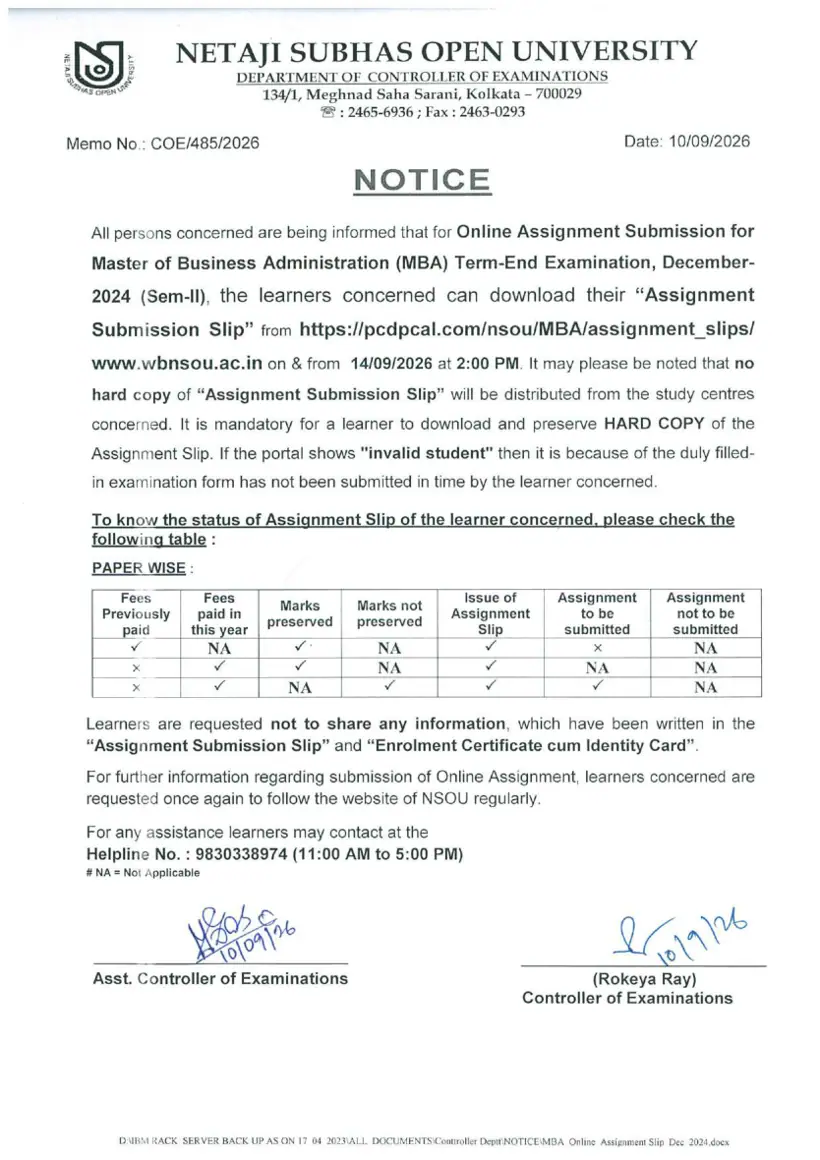
Netaji Subhas Open University published a notice on 1 October 2026 regarding the re-opening of online assignment submission for Master of Business Administration Term-End Examination December 2024 Semester-II. This re-opening allowed candidates who completed examination form submission to submit their pending assignment papers.
Earlier, NSOU conducted the initial MBA Semester-II online assignment submission from 24 September 2026 to 27 September 2026 under Memo COE/485(i)/2026. Learners had to download their assignment submission slip from the dedicated portal before submitting their answers.
The essentials
| University Name | Netaji Subhas Open University (NSOU) |
|---|---|
| Latest Assignment Notice | 1 October 2026 |
| Assignment Slip Portals | pcdpcal.com / nsoucebdp.com |
| MBA Dec 2024 Sem-II Portal | mbaasgn25.nsou.oepms.in |
| PG Dec 2024 Portal | pgasgn25.nsou.oepms.in |
| ADJMC Dec 2024 Portal | adjmcasgn25.nsou.oepms.in |
| Invalid Student Cause | Late examination form submission |
NSOU Assignment Status: submission rules and paper eligibility
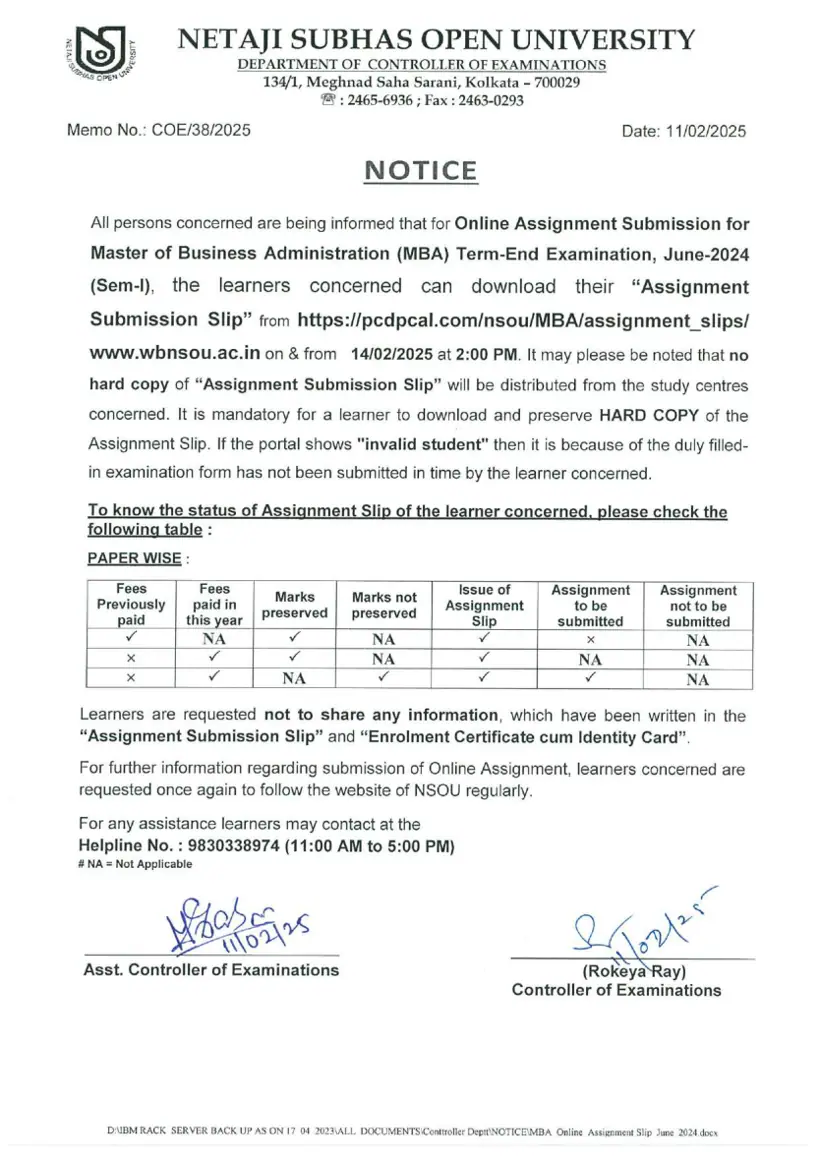
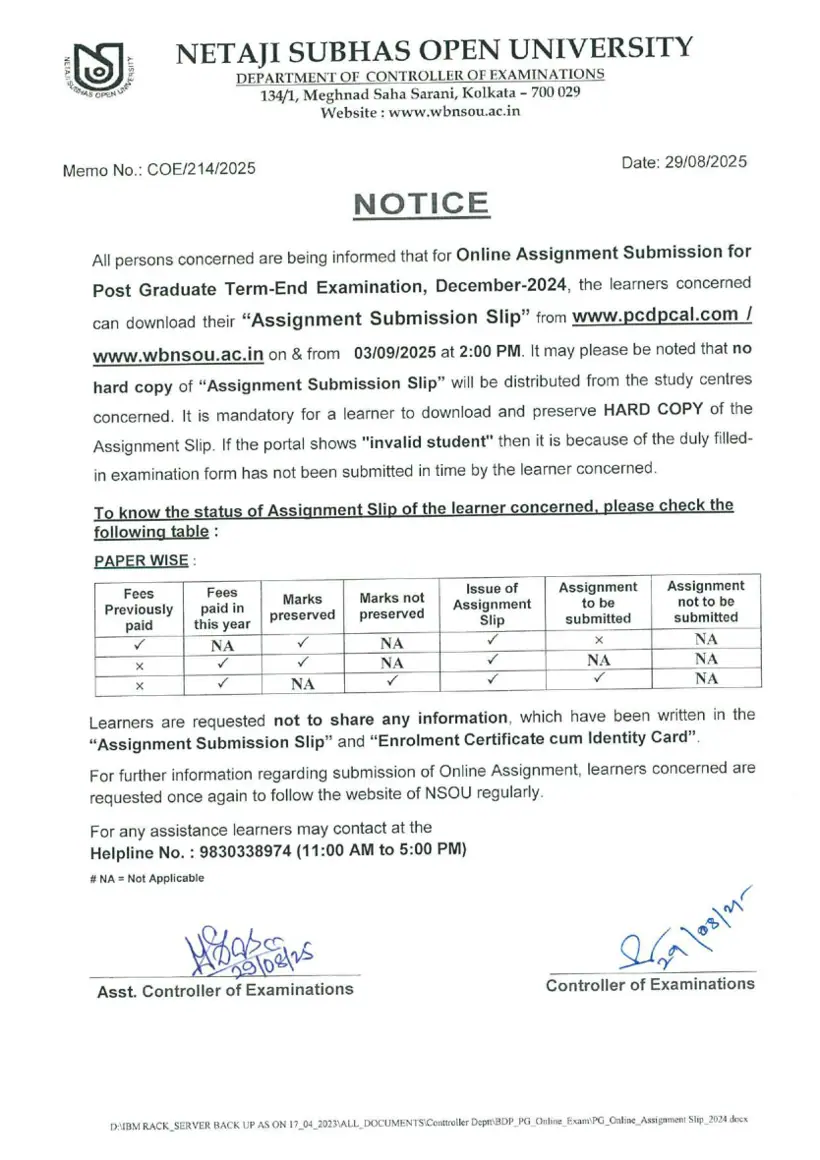
Netaji Subhas Open University determines paper-wise assignment eligibility based on exam fee payment history and preserved assignment marks. Candidates must download the official assignment submission slip to verify whether a specific subject paper requires fresh submission.
If a learner paid examination fees in the current year and assignment marks are not preserved, the assignment submission slip marks the paper for mandatory submission. Learners with preserved marks receive a slip but do not re-submit assignments.
NSOU Paper-wise Assignment Submission Status Rules
| Fees Previously Paid | Fees Paid Current Year | Marks Preserved | Issue of Slip | Assignment Submission Status |
|---|---|---|---|---|
| Yes | NA | Yes | Yes | Submission Not Required |
| No | Yes | Yes | Yes | Submission Not Required |
| No | Yes | No | Yes | Submission Required |

NSOU Assignment Status: important highlights
The official NSOU assignment status system operates through dedicated web portals specific to each academic programme and term-end examination session. Learners must review key operational parameters before accessing the online submission portals.
Key Assignment Submission Highlights
| Parameter | Official Specification |
|---|---|
| Mandatory Document | Hard Copy of Assignment Submission Slip |
| Authentication Method | Enrolment Number, Date of Birth, and Mobile OTP |
| Device Support | Smartphone, Tablet PC, Laptop, or Desktop Computer |
| Concurrent Login Rule | Login permitted on only one device at a time |
| Prerequisite Step | Duly filled-in examination form and fee payment |
NSOU: related tasks
How to check NSOU assignment status online?
Candidates can check their assignment submission status by downloading their official slip from the programme portal designated by Netaji Subhas Open University. Downloading and retaining a printed hard copy of the assignment slip is mandatory for all enrolled learners.
- Visit the official university portal at NSOU Assignments page or the designated portal link for your programme.
- Select your academic programme, such as NSOU PG Assignments or NSOU BDP Assignments.
- Click on the Assignment Submission Slip download link for your specific Term-End Examination session.
- Enter your Enrolment Number and Date of Birth exactly as printed on your Enrolment Certificate cum Identity Card.
- Download the generated Assignment Submission Slip and print a hard copy to check paper-wise submission status.
- Log into the dedicated assignment submission portal using your Enrolment Number, Date of Birth, and OTP to submit papers if required.
Details required for NSOU assignment status portal login
Accessing the NSOU assignment status slip and online evaluation portals requires specific student credential details issued during enrollment. Learners must verify these credentials against their official Identity Card before logging into university portals.
- Enrolment Number as printed on the Enrolment Certificate cum Identity Card
- Date of Birth matching official university records
- Registered Mobile Number or Alternative Mobile Number for OTP delivery
- Active internet connection on a supported Smartphone, Tablet PC, Laptop, or Desktop Computer
What to do if NSOU assignment portal shows invalid student?
The NSOU assignment status portal displays an invalid student message when pre-submission examination formalities remain incomplete. Netaji Subhas Open University rules state that this error occurs if the examination form was not submitted within the prescribed deadline.
Learners encountering the invalid student notification should check whether their examination fees and form submission were successfully processed. Official university notices published under NSOU Examination Notices specify pre-submission eligibility criteria for all sessions.
NSOU Assignment Status: program-wise submission portals and schedules
Netaji Subhas Open University maintains separate online portals and schedules for different academic programmes during each term-end examination session. Learners must access the specific web address assigned to their course for downloading slips and submitting papers.
NSOU Programme-wise Assignment Portals
| Programme | Exam Session | Assignment Slip Portal | Assignment Submission Portal |
|---|---|---|---|
| Master of Business Administration (MBA) | December 2024 Sem-II | pcdpcal.com/nsou/MBA/assignment_slips/ | mbaasgn25.nsou.oepms.in |
| Post Graduate (PG) | December 2024 | pcdpcal.com | pgasgn25.nsou.oepms.in |
| BDP & UGDP (CBCS) | December 2024 & June 2025 | nsoucebdp.com | wbnsou.ac.in |
| Advance Diploma in Journalism & Mass Communication (ADJMC) | December 2024 | wbnsou.ac.in | adjmcasgn25.nsou.oepms.in |
NSOU Assignment Status: next steps for distance learners
Learners preparing for upcoming term-end examinations must regularly monitor official notification updates for pending submission windows. Downloading assignment slips as soon as portals open ensures students do not miss mandatory submission deadlines.
Candidates should check the official NSOU Assignments portal to stay updated on assignment submission notices and download links.
NSOU Assignment Status official links and PDFs
- Check general NSOU assignment notices and updateswbnsou.ac.in ↗
- Access PG programme assignment portal pageswbnsou.ac.in ↗
- Access BDP programme assignment portal pageswbnsou.ac.in ↗
- Access Diploma programme assignment portal pageswbnsou.ac.in ↗
- Access B.Ed ODL programme assignment portal pageswbnsou.ac.in ↗
- Review official university examination noticeswbnsou.ac.in ↗
- NSOU MBA Online Assignment Submission Reopening Notice October 2026 PDF — Notice regarding re-opening of Online Submission of Assignment for MBA December 2024
- NSOU MBA Assignment Submission Slip Online Notice September 2026 PDF — Notice for online submission of Assignment for MBA December 2024 Sem-II
- NSOU MBA Online Assignment Submission Guidelines Semester II December 2024 PDF — Instructions for online submission of Assignment for MBA Term End Examination
- NSOU BDP UGDP Online Assignment Submission Instructions 2025 PDF — Instructions for online submission of Assignment for BDP & UGDP TEE
- NSOU Revised PG Assignment Submission Instructions December 2024 PDF — Revised notice for online assignment submission for PG TEE December 2024
What students ask about NSOU Assignment Status
What happens if NSOU assignments are not submitted before exams?
Netaji Subhas Open University requires learners to complete pre-submission assignment formalities before term-end examinations. Candidates whose assignment marks are not preserved must submit assignments online to satisfy term-end exam eligibility.
How do NSOU assignments work?
NSOU conducts assignment submissions online through dedicated web portals for eligible learners who submitted their examination forms. Candidates download an Assignment Submission Slip using their Enrolment Number and Date of Birth to identify required papers and log in via OTP.
Why does the NSOU assignment status portal display invalid student?
The portal displays an invalid student error message if the learner did not submit the duly filled-in examination form within the deadline. Pre-submission formalities including exam fee payment must be completed to access assignment slips.
Is downloading a hard copy of the NSOU assignment submission slip mandatory?
Yes, Netaji Subhas Open University mandates that every candidate must download, print, and preserve a hard copy of the Assignment Submission Slip. The slip confirms paper-wise assignment submission status.
Can candidates log into the NSOU assignment portal from multiple devices simultaneously?
No, NSOU assignment submission rules prohibit learners from logging into the online assignment portal through more than one device at the same time. Access is permitted via Smartphone, Tablet PC, Laptop, or Desktop Computer.
Which login details are needed for the NSOU PG assignment portal?
Candidates logging into the NSOU Post Graduate assignment portal must enter their Enrolment Number and Date of Birth. An OTP is sent to the candidate’s Registered Mobile Number or Alternative Mobile Number for verification.
What is the submission process for NSOU ADPRA Term-End Examination project papers?
Learners of the Advance Diploma in Public Relations and Advertising must create a 10 to 12 slide PowerPoint presentation on the prescribed topic for Paper II-B. The single PPT file mentioning the Enrolment Number, Roll, and Number must be emailed to nsoujmc@wbnsou.ac.in by 31st October 2026.
More on Assignments