
NSOU Student Login With Enrollment No and Student Zone Updates
Part of NSOU ID & Login: NSOU Phone Number and Support Contacts for the 2026-27 Session
- NSOU FYUG and BDP candidates complete online renewal on official university portals using their enrolment number.
- NSOU Ph.D. candidates log in at phd.wbnsouadmissions.com using their Application Id, Date of Birth, and Password.
- UGC DEB ID creation requires a valid ABC ID or APAAR ID registered on the official DEB portal deb.ugc.ac.in.
- Technical issues during NSOU portal login can be resolved by emailing collegeadmissionwb@gmail.com or calling 033 4006 8755.
In this article
- NSOU Student Login: September 2026 Online Renewal Notices
- NSOU Student Login With Enrollment No and Academic Portal Access
- NSOU Student Login: Important Highlights and Official Portals
- How to Access NSOU Ph.D. Candidate Login Portal?
- How to Create DEB ID for NSOU ODL Learners?
- Details Required for NSOU DEB ID Registration and Identity Verification
- What to Do If APAAR ABC Card Details or NSOU Login Verification Fails?
- NSOU Official Email ID and Technical Support Contact Details
- NSOU Student Portal Action: Complete Next Steps by October 2026
- NSOU ID & Login official links and PDFs
- What students ask about NSOU ID & Login
Netaji Subhas Open University (NSOU), also known as West Bengal’s premier State Open University, provides digital portal access for enrolled candidates across Four Year Undergraduate Degree Programme (FYUGDP), Bachelor Degree Programme (BDP), Post Graduate (PG), and Ph.D. programmes. Candidates access administrative services, term-end examination forms, personal contact programme routines, and renewal links using their enrolment number, application identity, Academic Bank of Credits (ABC) ID, and Distance Education Bureau (DEB) ID.
NSOU Student Login: September 2026 Online Renewal Notices
Netaji Subhas Open University published the online PG Renewal Notice 2024 (2nd Phase) on 24 September 2026 for Post Graduate learners. The university also released the Online FYUG/UG/BDP Renewal Notice 2026 on 23 September 2026 for undergraduate streams.
Candidates enrolled in Four Year Undergraduate Degree Programme (FYUGDP) and Bachelor Degree Programme (BDP) must complete online renewal using their enrolment number to proceed to the next academic year. Post Graduate candidates must submit online renewal applications through the official portal as notified by the university.
The essentials
| FYUG/UG Renewal Notice | 23 September 2026 |
|---|---|
| PG Renewal Notice (2nd Phase) | 24 September 2026 |
| Ph.D. Portal Link | phd.wbnsouadmissions.com |
| DEB ID Registration Portal | deb.ugc.ac.in/StudentDEBId |
| ABC Support Call Center | 18008893511 |
| Technical Query Helpline | +91 98301 68755 |
NSOU Student Login With Enrollment No and Academic Portal Access
NSOU student login services allow distance learners in UG, PG, and Diploma programmes to access marks transfer forms, admit cards, and Personal Contact Programme (PCP) schedules. Candidates use their official enrolment number to verify active registration status and access the NSOU examination portal.
The NSOU examination portal hosts notices for online assignment submissions, practical examination schedules, and term-end examination form fill-up dates.
Recent NSOU Examination and PCP Notices (September-October 2026)
| Notice Type | Programme/Batch | Details | Date of Notice |
|---|---|---|---|
| Marks Transfer Application | Post Graduate TEE, December-2024 | Online application notice | 01 October 2026 |
| Marks Transfer Application | BLIS TEE, December-2024 | Online application notice | 01 October 2026 |
| Assignment Submission | MBA TEE, December 2024 (Sem-II) | Re-opening of online submission | 01 October 2026 |
| Examination Form Submission | FYUG and UGDP(CBCS) TEE (Practical), Dec-2026 | Re-opening of 2nd Phase submission | 28 September 2026 |
| Admit Card Download | ADJMC, ADEL, ADPR TEE, December-2024 | Notice for admit card download | 17 September 2026 |
| PCP Schedule | PG-Economics 1st & 2nd Year | Classes at Basanti Devi College | September & October 2026 |
| PCP Schedule | PGJM Part-II, January 2024 Batch | Offline classes at Durgapur Regional Campus | September & October 2026 |
NSOU Student Login: Important Highlights and Official Portals
Netaji Subhas Open University operates specialized web portals for general academic student zone services, Ph.D. applicant logins, and UGC DEB ID linkings. Candidates must select the correct portal based on their enrolment type and academic level.
NSOU Portal Login Directory and Key Details
| Portal Purpose | Target Candidates | Required Credentials | Official Portal / Link |
|---|---|---|---|
| Ph.D. Applicant Login | Registered Ph.D. Candidates | Application Id, Date of Birth, Password | phd.wbnsouadmissions.com |
| DEB ID Registration | All ODL / Distance Learners | ABC ID, Aadhaar Name, Birth Year, Identity Proof | deb.ugc.ac.in/StudentDEBId |
| UG & PG Renewals | Enrolled FYUG, BDP, and PG Students | Enrolment Number, Date of Birth | wbnsou.ac.in |
| Marks Transfer & TEE Notices | BLIS, PG, and FYUG Candidates | Enrolment Number, Roll Number | wbnsou.ac.in/student_zone |
NSOU: related tasks
How to Access NSOU Ph.D. Candidate Login Portal?
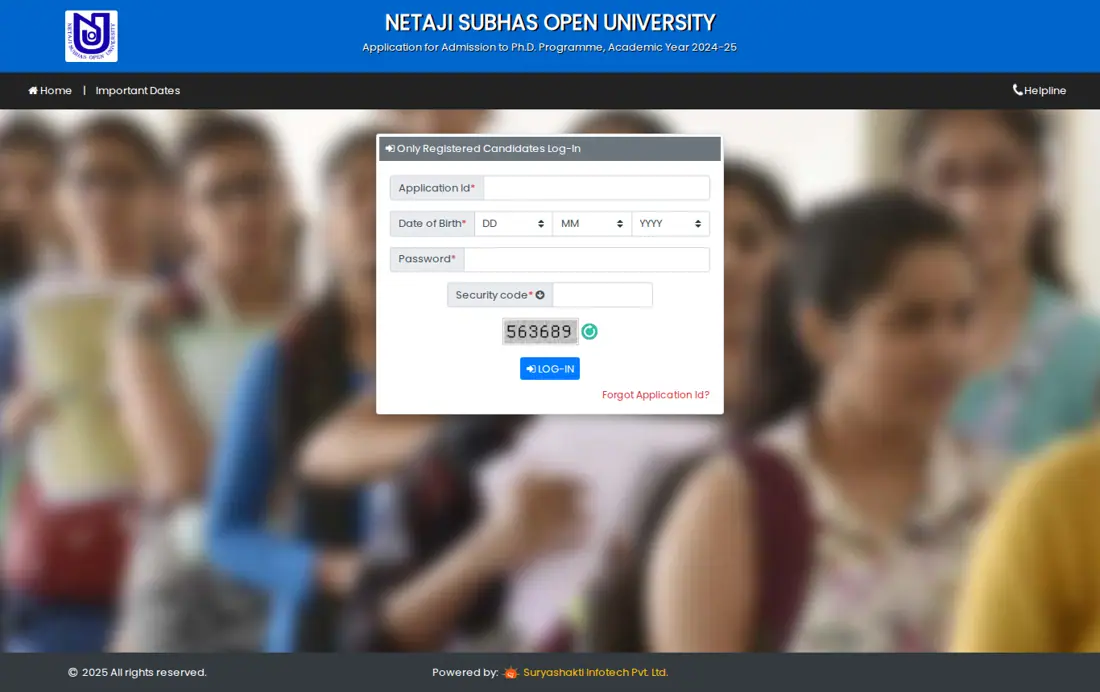
Registered candidates for the NSOU Ph.D. programme access their applicant portal to review admission status, payment receipts, and document verification details. Logging in requires credentials generated during the online application process.
- Open the official NSOU Ph.D. candidate login page.
- Enter your Application Id in the designated text field.
- Select your Date of Birth using the DD, MM, and YYYY dropdown menus.
- Enter your registered Password in the password field.
- Type the security code as shown on screen and click the ‘LOG-IN’ button.
How to Create DEB ID for NSOU ODL Learners?
University Grants Commission (UGC) Distance Education Bureau (DEB) ID creation is mandatory for learners pursuing Open and Distance Learning (ODL) courses at NSOU. Learners create their DEB ID on the central UGC DEB portal using their Academic Bank of Credits (ABC) ID.
- Open the official UGC DEB ID creation link at deb.ugc.ac.in ↗.
- Enter your valid 12-digit ABC ID or Automated Permanent Academic Account Registry (APAAR) ID.
- Fill in your Aadhaar Name, Birth Year, and select Gender from the dropdown menu.
- Provide Identity Provider details including Authentication Mode (such as PAN Card, Passport, UID, EPIC, or Driving License) and Identity Number.
- Enter your registered Email address, Mobile number, accept the consent statement, type the Captcha code, and click Submit.
Details Required for NSOU DEB ID Registration and Identity Verification
Creating a DEB ID requires matching candidate identity details between the ABC/APAAR card and official identity documents. Discrepancies must be corrected before submitting the DEB ID form.
- Valid Academic Bank of Credits (ABC) ID or APAAR ID.
- Candidate Name as printed on Aadhaar Card.
- Birth Year and Gender (Male, Female, or Transgender).
- Identity Proof Type (PAN Card, Passport, UID, EPIC, or Driving License) and Document ID Number.
- Consent Relation, Consent Place, active Email address, and Mobile number.
What to Do If APAAR ABC Card Details or NSOU Login Verification Fails?
Candidates experiencing errors in their ABC ID or APAAR card details must correct discrepancies prior to updating or creating their DEB ID. The UGC ABC portal provides dedicated support ticket resolution systems.
- Check your APAAR/ABC card carefully for errors in name, date of birth, or gender.
- Submit a support ticket on the ABC Support Ticket System at https://support.abc.gov.in/ or use the DigiLocker app.
- Contact the official ABC support call center at 18008893511 for immediate correction assistance.
- Confirm that corrections are reflected on your updated APAAR/ABC card.
- Access the DEB ID portal at deb.ugc.ac.in/StudentDEBId/UpdateDebDetails to update your DEB ID.
NSOU Official Email ID and Technical Support Contact Details
NSOU provides dedicated technical and payment helpline contacts for candidates encountering portal login, OTP verification, or fee payment issues. Technical queries are handled between 11:00 AM and 5:00 PM on working days.
- Technical Helpline Phone: +91 98301 68755 or (033) 4006 8755 (11 AM to 5 PM).
- Technical Query Email ID: collegeadmissionwb@gmail.com.
- Payment Issue Email ID: payments.collegeadmission@gmail.com.
- University Headquarters Phone: 033 4066 3220.
NSOU Student Portal Action: Complete Next Steps by October 2026
NSOU candidates must complete their pending UG and PG renewals on the official portal, following notices issued on 23 September 2026 for FYUG/UG/BDP and on 24 September 2026 for PG (2nd Phase). Learners must ensure their Academic Bank of Credits (ABC) ID and UGC Distance Education Bureau (DEB) ID are successfully generated and mapped.
This is mandatory for the 2026-27 academic session and must be completed before submitting term-end examination forms.
- Open the official UGC DEB ID creation link at deb.ugc.ac.in/StudentDEBId.
- Enter your valid 12-digit ABC ID or APAAR ID.
- Fill in your Aadhaar Name, Birth Year, and select Gender.
- Provide Identity Provider details including Authentication Mode (such as PAN Card, Passport, UID, EPIC, or Driving License) and Identity Number.
- Enter your registered Email address, Mobile number, accept the consent statement, type the Captcha code, and click Submit.
NSOU ID & Login official links and PDFs
- check examination noticeswbnsou.ac.in ↗
- access PhD applicant login portalphd.wbnsouadmissions.com ↗
- create UGC DEB IDdeb.ugc.ac.in ↗
- view student zone FAQswbnsou.ac.in ↗
- read Academic Bank of Credits informationwbnsou.ac.in ↗
- view Viksit Bharat program updateswbnsou.ac.in ↗
- NSOU Provisional Certificate Portal Availability Notice October 2026 PDF — notice regarding provisional certificate of BDP and UGDP TEE
- NSOU M.A. Economics PCP Routine Basanti Devi College September October 2026 PDF — PCP schedule for PG Economics at Basanti Devi College
What students ask about NSOU ID & Login
How do I access the NSOU student login portal?
Candidates access NSOU portal services by visiting the official university website wbnsou.ac.in and navigating to the Student Zone or specialized program portals like phd.wbnsouadmissions.com. For Ph.D. login, enter your Application Id, Date of Birth, and Password. For general UG/PG student logins and renewals, enter your official enrolment number and date of birth as prompted.
How to login NSOU student login with enrollment no?
Log in using your enrolment number on wbnsou.ac.in to access student services like online renewals and admit cards. The FYUG/UG/BDP Renewal Notice 2026 was released on 23 September 2026, and the PG Renewal Notice 2024 on 24 September 2026. Enter your enrolment number and date of birth on the renewal portal.
What is ABC ID in NSOU and how is it used?
An ABC ID is a unique 12-digit digital credit account storing academic credits. NSOU candidates must use their 12-digit ABC ID or APAAR ID to create a mandatory DEB ID on deb.ugc.ac.in for the 2026-27 academic session. Enter your ABC ID and Aadhaar details on deb.ugc.ac.in/StudentDEBId for UGC authentication.
How to create DEB ID for NSOU ODL programs?
Generate your mandatory UGC DEB ID by registering your ABC ID on deb.ugc.ac.in/StudentDEBId. Enter your 12-digit ABC ID or APAAR ID, Aadhaar Name, Birth Year, Gender, and authentication details. Provide email, mobile, and captcha, then submit to generate the ID.
What is the official NSOU email id for technical helpline support?
The official NSOU email for technical helpline support is collegeadmissionwb@gmail.com. For payment gateway failures, email payments.collegeadmission@gmail.com. You can also call +91 98301 68755 or (033) 4006 8755 between 11:00 AM and 5:00 PM on working days.
How do candidates perform NSOU applicant login for Ph.D. admissions?
Perform Ph.D. applicant login on phd.wbnsouadmissions.com/Application_2025/login_existing.php. Enter your Application Id, Date of Birth, Password, and the security captcha code, then click ‘LOG-IN’. This applies to registered candidates for the Ph.D. Academic Year 2024-25 session.
What should I do if my payment fails or double payment occurs during NSOU portal login?
If duplicate payment occurs for the same Application ID, NSOU refunds the duplicate amount upon verification. Candidates must submit a written application along with payment receipts to NSOU Headquarters (DD-26, Sector-I, Salt Lake City, Kolkata-700064) within one month from the admission closing date. You can also contact payments.collegeadmission@gmail.com or call (033) 4006 8755.
What to do if there is a discrepancy in ABC ID before DEB ID creation?
Correct any incorrect details on your ABC ID or APAAR card before generating a UGC DEB ID. Submit a correction request on support.abc.gov.in, use the DigiLocker app, or call 18008893511. After updates, proceed to deb.ugc.ac.in/StudentDEBId/UpdateDebDetails to finalize your DEB ID.
When were the NSOU online renewal notices for UG and PG programs published for 2026?
NSOU published the UG Renewal Notice 2026 on 23 September 2026 and the PG Renewal Notice 2024 (2nd Phase) on 24 September 2026. Enrolled candidates must log in to wbnsou.ac.in with their enrolment number and date of birth to complete academic renewal.
What is the NSOU refund policy if fee payment fails or duplicate payment occurs?
NSOU refunds admission fees for duplicate payments or inadvertently applying for two subjects. A written application with payment receipts must be submitted to NSOU Headquarters, DD-26, Sector-I, Salt Lake City, Kolkata-700064 within one month of the admission closing date.
What documents are required for NSOU DEB ID identity verification?
Creating a UGC DEB ID requires a valid 12-digit Academic Bank of Credits (ABC) ID or APAAR ID. Candidates must provide Aadhaar Name, Birth Year, Gender, email, mobile, and authenticate using a PAN Card, Passport, UID, EPIC, or Driving License ID.
How can FYUG and UGDP CBCS candidates submit examination forms for NSOU practical term-end examinations?
Candidates submit practical term-end examination forms online via wbnsou.ac.in using their enrolment number. NSOU released the notice for FYUG and UGDP CBCS TEE Practical Dec-2026 on 15 September 2026, with a re-opening notice on 28 September 2026.
How do Post Graduate and BLIS learners apply for NSOU online marks transfer?
PG and BLIS learners apply for marks transfer via the student zone portal on wbnsou.ac.in. NSOU published notices for PG TEE December-2024 and BLIS TEE December-2024 Online Marks Transfer Applications on 1 October 2026.
How can MBA learners access the NSOU portal for online assignment submission?
MBA learners access the assignment portal on wbnsou.ac.in. Instructions for Semester-II were released on 10 September 2026, with re-opening for MBA TEE December 2024 (Sem-II) on 1 October 2026.
How do candidates download admit cards for NSOU diploma term-end examinations?
Candidates download admit cards from the official student portal on wbnsou.ac.in by logging in with enrolment details. NSOU issued admit card download notices on 17 September 2026 for ADEL, ADJMC, and ADPR TEE December-2024. Learners must print their downloaded admit card for examination venue entry.
Where and when can PG Economics learners attend their NSOU Personal Contact Programme classes?
PG Economics learners attend their Personal Contact Programme (PCP) at Basanti Devi College, Rash Behari Avenue, Kolkata. Sessions for 1st and 2nd Year batches are scheduled for September and October 2026, including 06.09.2026, 13.09.2026, 20.09.2026, 27.09.2026, and 04.10.2026, from 10:00 AM to 4:30 PM.
In this section